
Registration Guide
Your How-To Guide for Registering for Classes
As we get closer to the week of class registration, it’s important to do the necessary prep work to make your registration week a successful one. This document also contains a ton of resources and information that will help you during and after registration week.
Pre-Registration checklist:
- I know when my enrollment appointment is.
- I am confident in my academic plan and the courses mapped out for the Fall 2026 semester.
- I have my LOCUS shopping cart filled with sections of validated classes I am thinking of taking (and some backup sections!).
If you’re able to check all three of those off, then you’re in great shape! If not, keep reading and we’ll help you figure these things out.
The general flow of registration looks like...
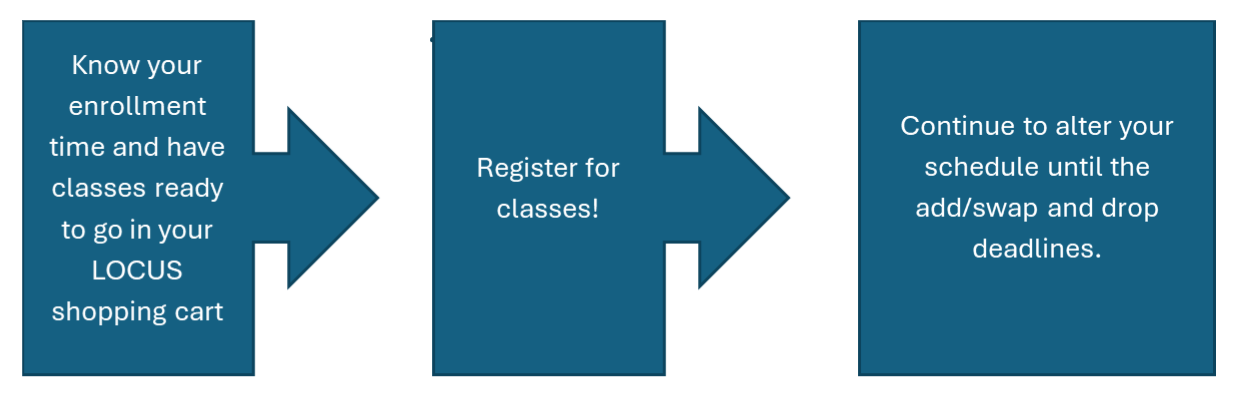
The dropdowns below include helpful guides and resources that can answer questions you may have.
How do I use LOCUS for class registration?
Class registration at Loyola takes place through LOCUS, so it’s important to get familiar with how it works.
LOCUS Class Registration Basics
This video covers:
- How to find your enrollment appointment
-
- An enrollment appointment is the day and time you can start enrolling for classes.
- This is based on earned (completed) credits.
- You can view the Registration Access Schedule page to get an idea of when you will register.
- Adding class sections to your LOCUS shopping cart
- You’ll want to do this before registration so you’re prepared.
- Plan ahead for the potential of classes filling up, so be prepared with back-up options!
- Shopping carts generally become available in LOCUS two weeks prior to registration.
- Validating the classes in your shopping cart
- This is asking LOCUS if you’ll be able to enroll when your pick time opens, or if you’ll receive an error.
LOCUS Registration Tips and Tricks
This video covers:
- Discussion sections (what they are and when/if you’d need to choose one)
- Swapping and dropping classes (helpful for once you pick your classes and you want to change your schedule)
- Waitlists (Not every class has waitlists, but if one does it’s important to know how they function if the class section you want has one, but is full)
How do I know what classes to take?
There are lots of different resources available to you to help you find your class requirements. Here’s a quick list and guide for each, so you have them in one place.
1. Your Academic Requirements Report on LOCUS
- This is a compiled list of your requirements for Core, School and College, and major (as well as additional majors/minors).
- It tells you if you’ve ‘satisfied’ the requirement already, or if it’s “not satisfied”, meaning it’s something you’ll still need to complete for graduation
To find your Academic Requirements report you can:
- Log into LOCUS
- Go to ‘Academic Progress’
- Click ‘My Academic Requirements’ on the lefthand side
- If it’s overwhelming, try clicking the ‘collapse all’ and viewing it section by section
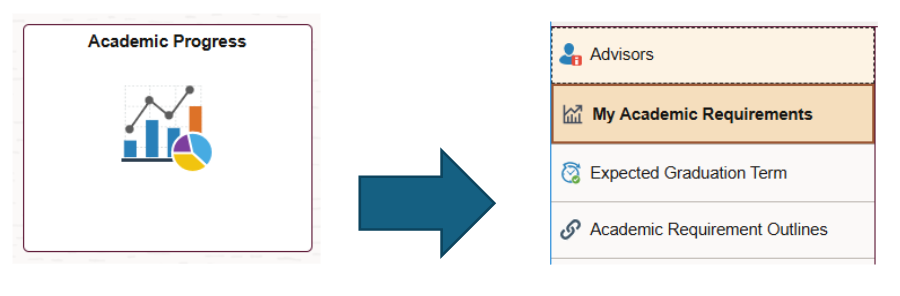
2. Your Major and Minor Curriculum Requirements
These are the official listings of the requirements for your major published by the schools and colleges that house them.
- Go to the general Undergraduate Catalog page
- Find your school or college on the lefthand side (everyone’s major belongs to one of these) and ‘click’ it
- Find your specific major (or minor) and click into it
- You may need to go into an ‘academics’ tab to find your specific major
- Click the ‘curriculum’ tab near the top
- This should show you a compiled list of classes required to complete
- Make sure to read the through the curriculum because there are many sections that say “choose 2 of..” or other rules to follow.
- If you click the specific classes, most should tell you if there are prerequisite requirements (classes you need to take first) or corequisite requirements (classes you need to take with it)
- This should show you a compiled list of classes required to complete
- All majors also have a suggested sequence to help you “stay on track” with your major. Scroll down to the drop down that says, “Suggested Sequences of Courses” to get a good idea of what you should take next semester
- Remember: this says suggested, which means it is not the only way to meet your curriculum requirements
- You may find yourself “ahead” due to transfer credits, or “behind” due to math placement. You will still likely graduate within four years, but ask if you have questions!
3. Core Curriculum Guide
Every student is required to complete the Core curriculum in some capacity at Loyola before they graduate, so those classes often find a presence in your class schedules relatively frequently.
- First find your which Core Requirements have been satisfied by your major/degree program so you know which Core areas you don’t need to take
- Every major (and many minors) waive students from taking that specific Core area, so make sure you know which yours are!
- If you utilize your Academic Requirements Report in LOCUS and you have your major/minor(s) correctly declared in LOCUS, these core classes that you are satisfied by your major/degree program are already removed from the list.
- If you’re interested in knowing what class options exist for each core area, this page has every Core area and class options for each
- Your Academic Requirements Report will also keep a running list of which you need, and which you’ve already satisfied (this is based on major). So, if your major/minor(s) are declared correctly in LOCUS, your waived core areas will not show up on your Academic Requirements Report. (awesome, right?)
Frequently Asked Questions
How many credits should I be taking?
- Generally, students will want to take somewhere in the 14-17 credit-range every semester, but this can really vary based on major, transfer credits, or other factors.
What if I haven’t taken my placement tests for writing or math yet and still need to?
- You can visit the Writing Placement Assessment page for additional information about completing the assessment.
- The Math Placement Assessment (for enrolling in MATH 100-MATH 117-MATH 118-MATH 131/161, and/or MATH 110/130) can be obtained through multiple methods, but the fastest is by taking the ALEKS placement exam. You can find more information about the process on the Math Placement Assessment page.
I know I need UCWR 110 at some point because it’s a core requirement, when is the best time to take it?
- As soon as you’re able! It’s a prerequisite for Writing Intensive classes (which take 2 semesters to complete if you need them) and it’ll help you get up to speed on college-level writing.
Additional Resources
Your Academic Advisor!
Every student has an assigned academic advisor that they can:
- Email (Found in LOCUS under Academic Progress -> Advisors)
- Schedule an appointment with through Navigate360
- If you want to speak with an advisor and cannot find an open appointment in Navigate leading up to Registration, see Express Advising below for our drop-in advising available for all first and second year students.
Academic Planning Workshop Materials
If you missed the in-person or Zoom major/school specific workshops, the Academic Planning Workshop Materials are good general overviews you can access
- Note: with majors and minors, the year you declare it on your degree plan is the set of requirements you should follow, generally. Ex: if you declare a Biology BS next year, you wouldn’t use the past year’s curriculum as guidance, you’d use 2026-2027's curriculum.
Express Advising
For quick, in-person (Sullivan 260) or virtual meetings with advisors to help answer those 10-minute, or less, questions! You can visit our Express Advising page to see what days and times Express Advising is available.
Advising’s Academic Planning Resources
You can utilize our Academic Planning page for help with how to create a 4-year plan. This includes a blank, downloadable academic plan template.
Your How-To Guide for Registering for Classes
As we get closer to the week of class registration, it’s important to do the necessary prep work to make your registration week a successful one. This document also contains a ton of resources and information that will help you during and after registration week.
Pre-Registration checklist:
- I know when my enrollment appointment is.
- I am confident in my academic plan and the courses mapped out for the Fall 2026 semester.
- I have my LOCUS shopping cart filled with sections of validated classes I am thinking of taking (and some backup sections!).
If you’re able to check all three of those off, then you’re in great shape! If not, keep reading and we’ll help you figure these things out.
The general flow of registration looks like...
The dropdowns below include helpful guides and resources that can answer questions you may have.