Purchase Request Processes
FAQs
Submitting a Purchase Request
***Please make sure to select the appropriate account for your purchase request. I.e. (SAF, SUF, or Revenue).***
- The deadline to submit a credit card payment request is at least 14 days (non-business days) before the event. Remember to consider shipping time when assessing the payment date.
- Login to LUCommunity using your Loyola UVID and password
Submitting a Reimbursement Request
**Please Note: Taxes are not reimbursable, per Loyola University Policy**
- Reimbursements are at the discretion of CSE's director. Please note it is not guaranteed a reimbursement will be granted. Please make sure to submit a purchase request instead of doing last minute purchases.
- Email activities@luc.edu with reasoning behind needing the reimbursement. The purchasing team will relay further instructions.
What to Include in Request:
- Reimbursement Acknowledgment Form
- Receipts or Invoices with all items listed, date of purchase, and grand total.
Revenue - Submitting deposits
All deposits for organizations must be turned in at the CSE office within 24 hours of the event. All checks must be made payable to Loyola University Chicago. A confirmation will be uploaded to your organization’s LUCommunity portal.
- Student organization drops off money at the Center for Student Engagement.
- Student Fills out the following information on the Deposit slip (slip provided at CSE office):
-
- Name of the organization
- What is the deposit for
- An amount
- Partially completed (found at CSE office)
- Sections to be completed by the student organization are:
- Currency and coins section – for cash deposits
- Check the section for check deposits
- Deposit Description section for all deposits
- Cash must be organized by currency denominations
- Sections to be completed by the student organization are:
Process:
- CSE staff reviews the form, completes the remaining fields, including Date, Contact name, Department, and contact phone number, and prints two copies.
- CSE staff verifies that cash is organized (no re-count is needed).
- Student organizations can leave the money and deposit slip with CSE to process.
- The Bursar's office will send a receipt to the CSE to confirm the deposit has been processed and the amount.
- CSE staff updates the LUCommunity revenue account only when confirmation from the bursar office is received.
- The student organization is notified that the deposit has been processed. The deposit receipt is filed under the Student Organization account.
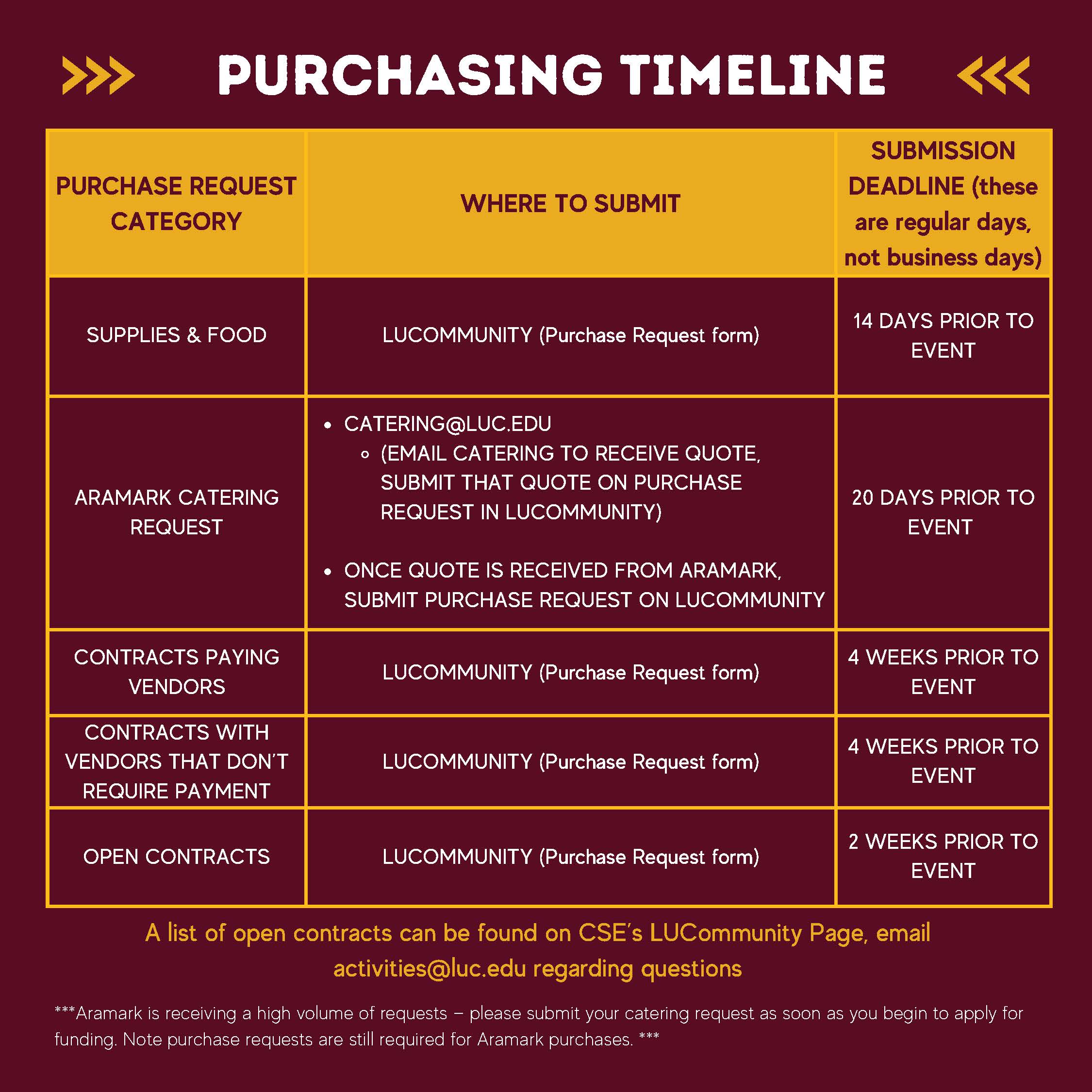
Purchasing Timeline