
CrowdStrike
Every university-owned computer should be running CrowdStrike
University-Owned Computers
All university-owned computers including Windows, macOS, and Linux will have CrowdStrike EDR installed. CrowdStrike EDR is updated and maintained by the Information Security & Compliance (ISC) team.
What is CrowdStrike?
CrowdStrike is an endpoint protection platform that provides next-generation protection against viruses. It includes additional features that regular anti-virus does not have to prevent more sophisticated security threats.
Why CrowdStrike?
CrowdStrike provides an anti-virus solution that does not impact performance. Additionally, CrowdStrike provides protection against advanced attacks and helps UISO to respond to advanced threats quickly.
What should I do with my personal computer?
Anti-Virus recommendations for personal computers can be viewed here.
How does it work?
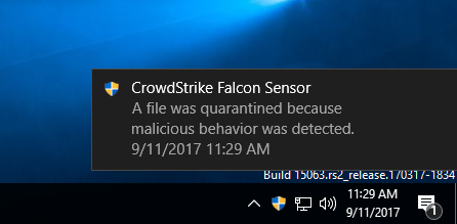
Like most anti-virus solutions, CrowdStrike works in the background. In the event of a detection, there are two pop-ups that may occur, the first is a warning that something attempted to be run that was identified as a virus:
In the event that a virus is identified, CrowdStrike will prevent it from launching. In the event of a sophisticated attack requiring immediate attention, we may "quarantine" a device. When this occurs, the device will remain on but unable to access any network resources. A notification will also be displayed:
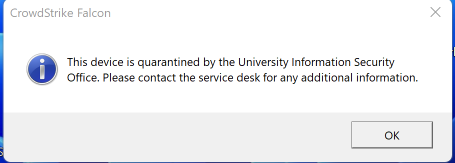
If this notification occurs, please do not turn off your workstation unless instructed by ITS. We will reach out to you, but you may also submit a ticket to the ITS Service Desk for further information.
Every university-owned computer should be running CrowdStrike
University-Owned Computers
All university-owned computers including Windows, macOS, and Linux will have CrowdStrike EDR installed. CrowdStrike EDR is updated and maintained by the Information Security & Compliance (ISC) team.
What is CrowdStrike?
CrowdStrike is an endpoint protection platform that provides next-generation protection against viruses. It includes additional features that regular anti-virus does not have to prevent more sophisticated security threats.
Why CrowdStrike?
CrowdStrike provides an anti-virus solution that does not impact performance. Additionally, CrowdStrike provides protection against advanced attacks and helps UISO to respond to advanced threats quickly.
What should I do with my personal computer?
Anti-Virus recommendations for personal computers can be viewed here.
How does it work?
Like most anti-virus solutions, CrowdStrike works in the background. In the event of a detection, there are two pop-ups that may occur, the first is a warning that something attempted to be run that was identified as a virus:
In the event that a virus is identified, CrowdStrike will prevent it from launching. In the event of a sophisticated attack requiring immediate attention, we may "quarantine" a device. When this occurs, the device will remain on but unable to access any network resources. A notification will also be displayed:
If this notification occurs, please do not turn off your workstation unless instructed by ITS. We will reach out to you, but you may also submit a ticket to the ITS Service Desk for further information.