
Google Pixel Wireless
Connecting to Eduroam network on Google Pixel Devices
To connect to Eduroam wireless network properly, follow the directions below:
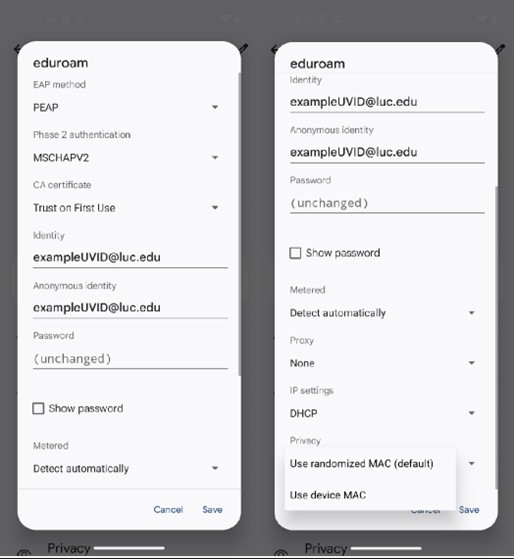
EAP Method: PEAP
Phase 2 Authentication: MSCHAPV2
CA Certificate: Trust on First Use
Identity: Your full Loyola email address UVID@luc.edu (When connecting to LUC - enter your username/uvid ONLY do not enter your email address)
Anonymous Identity: Your full Loyola email address UVID@luc.edu (When connecting to LUC - leave blank)
Password: Your current password
Recommended (not required) Make sure "Use Device MAC" is selected under advanced settings for the Eduroam SSID.
Connecting to Eduroam network on Google Pixel Devices
To connect to Eduroam wireless network properly, follow the directions below:
EAP Method: PEAP
Phase 2 Authentication: MSCHAPV2
CA Certificate: Trust on First Use
Identity: Your full Loyola email address UVID@luc.edu (When connecting to LUC - enter your username/uvid ONLY do not enter your email address)
Anonymous Identity: Your full Loyola email address UVID@luc.edu (When connecting to LUC - leave blank)
Password: Your current password
Recommended (not required) Make sure "Use Device MAC" is selected under advanced settings for the Eduroam SSID.